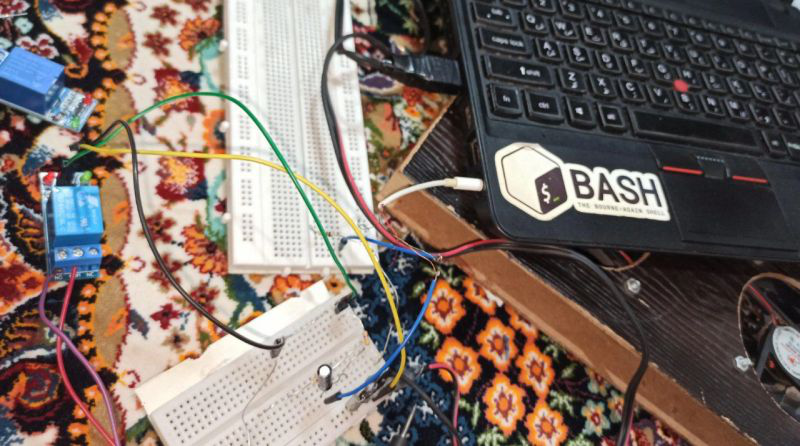
Controlling a Laptop Cooling Fan Through the Audio Jack
Introduction
I recently built a cooling fan for my laptop with an interesting twist: instead of using a microcontroller or development board, I wanted to control it directly using the laptop’s own hardware. The goal was simple—turn on the fan when the laptop temperature exceeds a certain threshold. But the implementation? That’s where things got interesting.
The Challenge
The straightforward approach would have been to use an ESP32 or similar microcontroller, send temperature data over WiFi, and control the fan accordingly. But where’s the fun in that? I wanted to make this project more challenging by controlling external hardware using only what the laptop itself could offer.
Initial Attempts: USB Power Control
My first idea was to cut power to a USB port when the fan wasn’t needed. Unfortunately, this proved impossible on my laptop. Even when the system is shut down, the USB ports remain powered—there’s no software-level control available to disable them. The data lines of USB also didn’t offer any useful control mechanism for this purpose.
The Solution: Hijacking the Audio Jack
After ruling out USB, I turned my attention to the AUX (audio) port. This turned out to be much more promising. When audio plays through the headphone jack, you can observe clear, controllable changes in the output signal—the voltage fluctuates with the audio frequencies.
Here’s how I implemented the solution:
The Software Side
I wrote a background script on Linux that:
- Continuously monitors the laptop temperature using
/sysfilesystem (Linux exposes hardware information through sysfs) - When temperature exceeds the threshold, plays an audio signal (essentially a waveform) through the AUX port
- Uses ALSA and the
playcommand to output audio and activate the AUX port
The Hardware Side
The AUX output (both left and right channels) produces an analog waveform. To control a fan, I needed to convert this to a digital signal. I built a small circuit to perform this analog-to-digital conversion.
Note: This could have been done more simply using GPIO converters, but I specifically wanted to implement the idea using readily available hardware components.
Important Safety Warning
Warning: If you attempt this project, be extremely careful not to damage your laptop or computer. One mistake during my implementation caused my laptop battery to drain unexpectedly. Always test carefully and consider the risks before connecting custom circuits to your devices.
Technical Details
Working on Linux made this project much more feasible:
- Temperature monitoring: Access hardware sensor data through
/sys/class/thermal/or/sys/class/hwmon/ - Audio control: ALSA (Advanced Linux Sound Architecture) and utilities like
aplayorplayfor audio output - Background execution: Run the monitoring script as a daemon or systemd service
The analog signal from the AUX port needed to be converted to something that could drive a fan control circuit. The specific approach depends on your fan’s requirements, but generally involves:
- Rectifying the AC audio signal
- Smoothing/filtering the output
- Triggering a transistor or relay based on signal presence
Conclusion
This project was a fun exercise in creative problem-solving with limited resources. While using a microcontroller would have been simpler, controlling external hardware through unconventional laptop ports like the audio jack made for an interesting challenge.
The implementation works reliably—when the laptop heats up, the script plays an audio tone, the AUX port outputs a signal, my circuit detects it, and the fan spins up. It’s not the most elegant solution, but it’s certainly one of the more unique approaches to laptop cooling!
Final Thoughts
There aren’t many other specific details about this small project worth mentioning, but it demonstrates that with a bit of creativity, you can repurpose existing hardware interfaces for unexpected applications. The audio jack, typically used only for sound output, becomes a control signal generator. Sometimes the most interesting projects come from artificial constraints—in this case, “control a fan without using a microcontroller.”