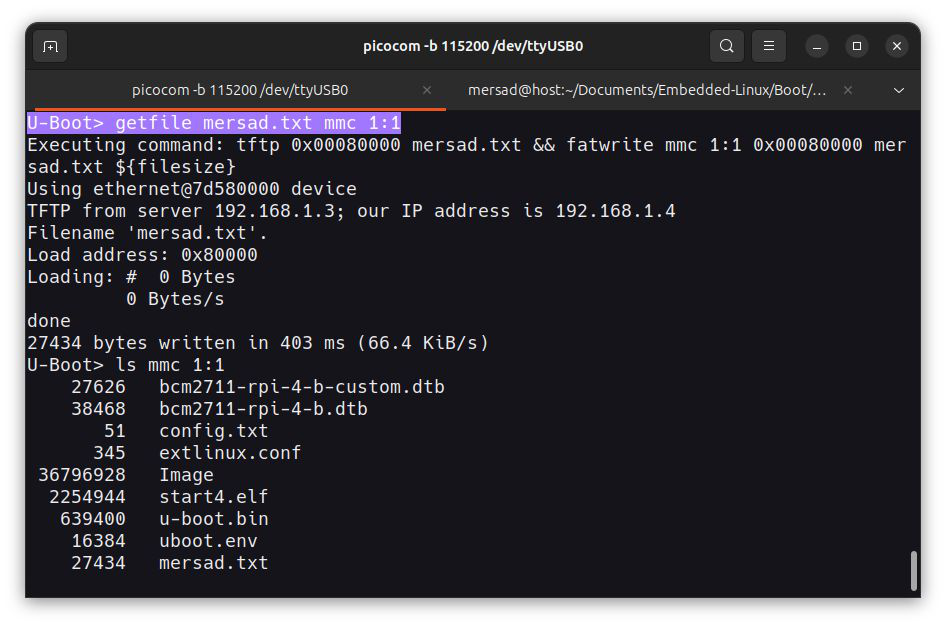
File Download via TFTP in U-Boot
Summary
If your saved environment (and scripts) are unavailable after boot, you can embed a small U-Boot command in C that downloads a file via TFTP and writes it to MMC. Save the C file in cmd/, add it to the Makefile, rebuild U-Boot and you’ll have a getfile command available at the prompt.
What it does
- Downloads
<filename>from TFTP intokernel_addr_r. - Writes the downloaded data to the specified MMC
deviceandpartusingfatwrite. - Uses the existing
kernel_addr_renvironment variable (must be set).
How to add
- Put the C file (example below) into
u-boot/cmd/(or the appropriate cmd directory). - Add the new source file to the cmd Makefile (
obj-y += yourfile.oor similar). - Build U-Boot (
make CROSS_COMPILE=...) and flash/test on the board. - Usage in U-Boot prompt: getfile
Example: getfile uImage mmc 0:1
Example C command (save as cmd_getfile.c in cmd/)
1
2
3
4
5
6
7
8
9
10
11
12
13
14
15
16
17
18
19
20
21
22
23
24
25
26
27
28
29
30
31
32
33
34
35
36
37
38
39
40
41
42
43
44
45
46
47
48
49
50
51
#include <common.h>
#include <command.h>
#include <env.h>
#include <stdlib.h>
#include <stdio.h>
#include <string.h>

static int do_getfile(struct cmd_tbl *cmdtp, int flag, int argc, char *const argv[])
{
    char cmd[256];
    const char *filename;
    const char *device;
    const char *part;
    const char *kernel_addr_r;

    if (argc != 4) {
        printf("Usage: getfile <filename> <device> <part>\n");
        return CMD_RET_USAGE;
    }

    filename = argv[1];
    device = argv[2];
    part = argv[3];

    kernel_addr_r = env_get("kernel_addr_r");
    if (!kernel_addr_r) {
        printf("Error: kernel_addr_r environment variable not set.\n");
        return CMD_RET_FAILURE;
    }

    snprintf(cmd, sizeof(cmd), "tftp %s %s && fatwrite %s %s %s %s ${filesize}",
             kernel_addr_r, filename, device, part, kernel_addr_r, filename);

    printf("Executing command: %s\n", cmd);

    if (run_command(cmd, 0) != 0) {
        printf("Error executing command.\n");
        return CMD_RET_FAILURE;
    }

    return CMD_RET_SUCCESS;
}

U_BOOT_CMD(
    getfile,
    4,
    0,
    do_getfile,
    "Download file via TFTP and write to MMC",
    "<filename> <device> <part>"
)
Notes
Make sure the environment variable
kernel_addr_ris defined before using the command, for example:
setenv kernel_addr_r 0x82000000The command assumes you are writing to a FAT partition.
If your target uses another filesystem (like ext4), replacefatwritewith the proper write command (e.g.ext4write).The combined TFTP and write operation is handled as a single chained command with
&&,
so the write step only runs if the TFTP download succeeds.You can change the behavior easily by modifying the
snprintf()command format —
for example, to store the file in memory only, remove thefatwritepart.Ensure that
CONFIG_CMD_TFTPandCONFIG_CMD_FAT(or equivalent) are enabled in your U-Boot configuration.This approach helps when you don’t have access to environment variables or saved scripts after boot,
as the functionality is built directly into the U-Boot binary.