Implementing Multiple Root Filesystem Fallback in Linux Kernel
The Problem: When Your Root Filesystem Fails
During embedded Linux development, we often encounter situations where the root filesystem (rootfs) mounting fails, leading to a dreaded kernel panic. This can happen for various reasons:
- An unstable rootfs under active development
- NAND flash reaching end of life on deployed devices
- Network issues preventing NFS mounts
- Corrupted filesystem partitions
What if we could provide the kernel with multiple rootfs options and let it automatically fall back to alternatives if the primary one fails?
The Solution: Priority-Based Root Filesystem Selection
I implemented a new kernel command-line parameter called root_pr (short for root_priorities) that accepts an ordered list of potential root filesystems. The kernel attempts to mount each one in sequence until it succeeds.
Syntax
1
root_pr="/dev/nfs;/dev/mmcblk1p2;/dev/sda1"
The semicolon-separated list tells the kernel: “Try NFS first, then the SD card partition, then the USB drive.”
Real-World Use Case
Imagine you’ve deployed embedded devices with NAND flash storage. After several years, the NAND reaches its write cycle limit and becomes unreliable. Without firmware updates, your devices would be bricked. With root_pr, you can configure a fallback:
1
root_pr="/dev/mtd0;/dev/mmcblk1p2"
The device first attempts to boot from NAND, but if that fails, it automatically switches to an SD card—no user intervention required.
Supported Device Types
The root_pr parameter supports various storage and network options:
Block Devices
Standard block devices like SD cards, eMMC, USB drives, and SATA drives:
1
2
3
/dev/mmcblk1p2
/dev/sda1
/dev/sdb2
PARTUUID
Using partition UUIDs for more reliable device identification:
1
PARTUUID=12345678-1234-1234-1234-123456789abc
MTD Devices
Raw NAND/NOR flash partitions:
1
2
mtd0
mtd1
UBI Volumes
UBI volumes for managed NAND flash:
1
2
ubi0:rootfs
ubi0_0
Network Filesystems
NFS and CIFS for network-based root filesystems:
1
2
/dev/nfs
/dev/cifs
How It Works
When the kernel boots with the root_pr parameter:
- Parsing Phase: The parameter string is parsed into individual device paths
- Sequential Mounting: The kernel attempts to mount each device in order
- Device-Specific Handlers: Based on the device type (block, MTD, network, etc.), the appropriate mounting function is called
- Fallback Logic: If mounting fails, the next device in the list is tried
- Success or Panic: Either a rootfs mounts successfully, or the kernel panics after exhausting all options
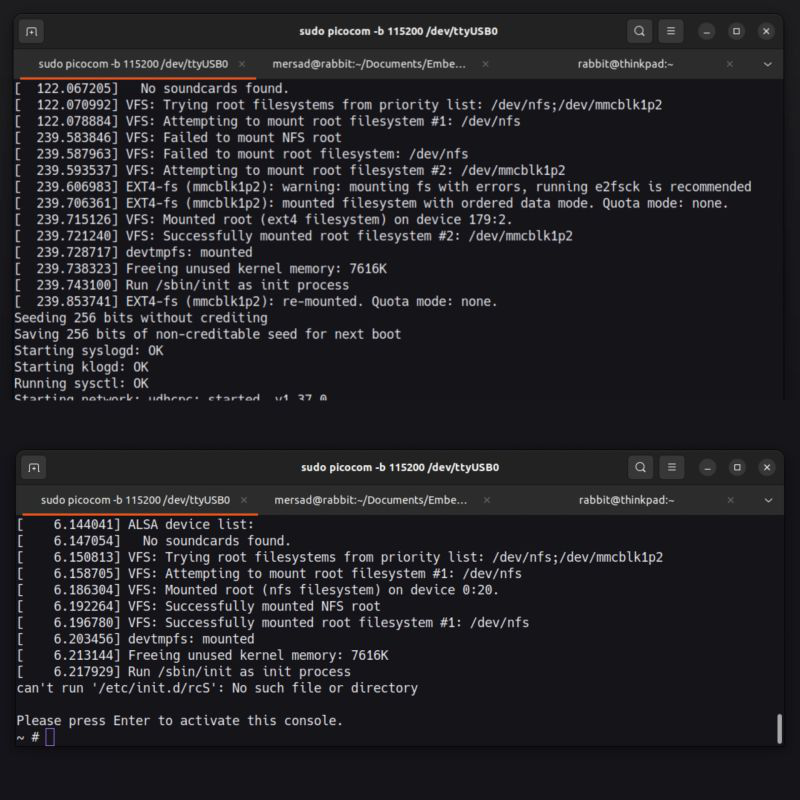
Practical Example: NFS with SD Card Fallback
Let’s walk through a real scenario with this kernel command line:
1
root_pr="/dev/nfs;/dev/mmcblk1p2"
Scenario 1: Network Available
When the network connection is available:
- Kernel attempts NFS mount
- NFS server responds successfully
- System boots with NFS rootfs
- Development workflow continues seamlessly
1
2
3
[    2.315421] VFS: Trying to mount root from /dev/nfs
[    2.487632] NFS: Server 192.168.1.100 OK
[    2.491847] VFS: Mounted root (nfs filesystem) readonly
Scenario 2: Network Unavailable
When the network is down or NFS server is unreachable:
- Kernel attempts NFS mount
- Connection timeout or failure detected
- Kernel automatically switches to next option:
/dev/mmcblk1p2 - SD card rootfs mounts successfully
- System boots from local storage
1
2
3
4
5
6
[    2.315421] VFS: Trying to mount root from /dev/nfs
[    5.892341] NFS: Server not responding, timeout
[    5.897123] VFS: Failed to mount /dev/nfs
[    5.901234] VFS: Trying to mount root from /dev/mmcblk1p2
[    6.124567] EXT4-fs: mounted filesystem with ordered data mode
[    6.130891] VFS: Mounted root (ext4 filesystem) readonly
Implementation Considerations
Kernel Module Modifications
The implementation requires modifications to the kernel’s init sequence, specifically in init/do_mounts.c. The key changes include:
- Adding the
root_prparameter parsing logic - Implementing device type detection
- Creating a loop that iterates through the priority list
- Handling different mount methods for each device type
Error Handling
Important: Each mount attempt must properly clean up resources before trying the next device. Failed attempts should log informative messages without causing side effects that might interfere with subsequent attempts.
Performance Impact
The fallback mechanism introduces minimal overhead:
- Only activates when mount failures occur
- Each attempt fails fast with appropriate timeouts
- No impact on successful first-attempt mounts
Conclusion
The root_pr parameter provides a robust, kernel-level mechanism for rootfs fallback. While alternative approaches exist, implementing this directly in the kernel offers unique advantages in terms of simplicity and reliability.
For embedded Linux developers, this feature can transform a potential brick into a self-recovering system. For development environments, it eliminates the frustration of kernel panics during rootfs experimentation.
Note: This implementation is a custom kernel modification. If you’re interested in using it, you’ll need to patch and rebuild your kernel. The concept could potentially be proposed as an upstream kernel feature if there’s sufficient community interest.
Patch and Documentation
Enablement package (patch and documentation):
1
https://mega.nz/file/BrNxDCCS#kU7jfym0ITwEYks-ISY3Ld8vClgJbUa7mva9Oe3-6cI
Example Configurations
Here are some practical configurations for different scenarios:
1
2
3
4
5
6
7
8
9
10
11
# Development with network boot fallback
root_pr="/dev/nfs;/dev/mmcblk1p2;/dev/sda1"

# Production with A/B update system
root_pr="PARTUUID=aaaa-bbbb;PARTUUID=cccc-dddd"

# NAND flash with SD card fallback
root_pr="ubi0:rootfs;/dev/mmcblk0p2"

# Multi-storage redundancy
root_pr="mtd0;ubi0_0;/dev/mmcblk1p2;/dev/sda1"