Processing Kernel Command Line Parameters
Kernel command line is basically a string passed from the bootloader to the kernel to tune behavior or pass settings at boot time.
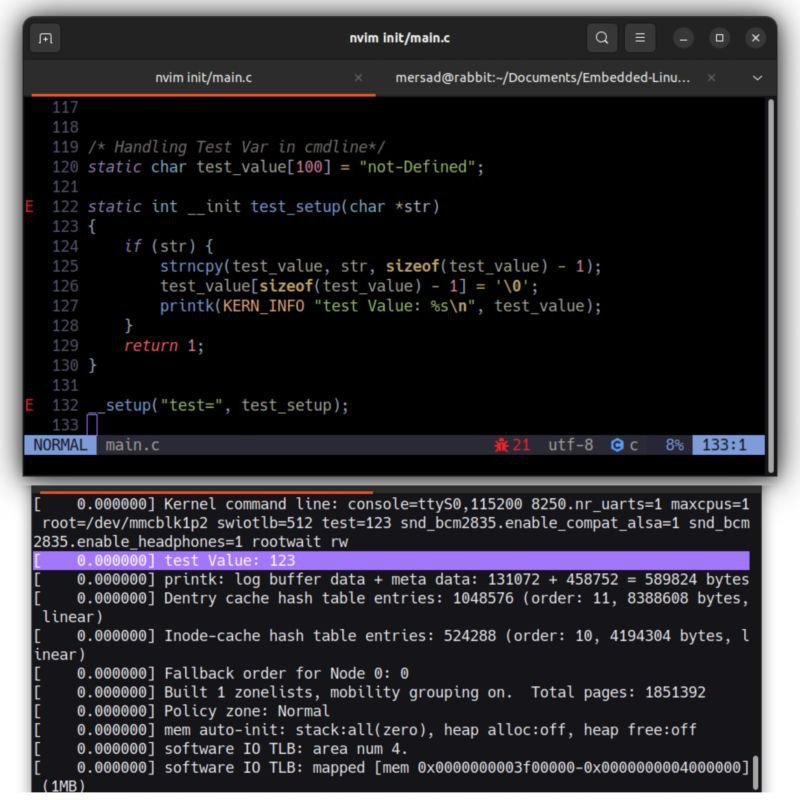
Some cmdline parameters are meaningful to the kernel — that means there is a function registered to handle them. Other parameters may be read later by init or userspace, or have no special kernel meaning at all. In this post I’ll show how to register a custom kernel parameter and process it during boot. The example handles a parameter named test and prints its value if present on the kernel command line.
Implementation (simple)
Add a small handler (for example inside init/main.c or another early-init file) and register it with early_param. Example:
1
2
3
4
5
6
7
8
9
10
11
12
13
#include <linux/init.h>
#include <linux/kernel.h>

/* Called early during boot when "test=..." is present on the kernel cmdline */
static int __init parse_test_param(char *arg)
{
    /* arg points to the string after "test=" or is NULL if no value */
    pr_info("cmdline: test=%s\n", arg ? arg : "(empty)");
    return 0; /* return non-zero to signal parse error if needed */
}

/* Register the handler for the "test" kernel parameter */
early_param("test", parse_test_param);
Placement and Build
Place that code in the kernel source (for example, init/main.c), rebuild the kernel, and boot it with a command line that includes your custom parameter test=....
Testing
Build and install the new kernel
1
2
3
make -j$(nproc)
make modules_install
make modules_install
Add the parameter to your boot entry (GRUB or your bootloader)
Example entry in GRUB configuration:
1
linux /vmlinuz-... root=/dev/xxx console=ttyS0,115200 test=123
Boot the kernel and check the early boot messages either through a serial console or by running:
1
 dmesg | grep cmdlind
You should see an output like: [ 0.123456] cmdline: test=123…
This confirms that the kernel successfully parsed the test=123 parameter and executed your early_param handler during the boot process.
You can now extend this handler to parse numbers, initialize global variables, or trigger any early configuration logic needed for your specific setup.