Using Mobile Phone as Rootfs
Using Mobile Phone as Rootfs
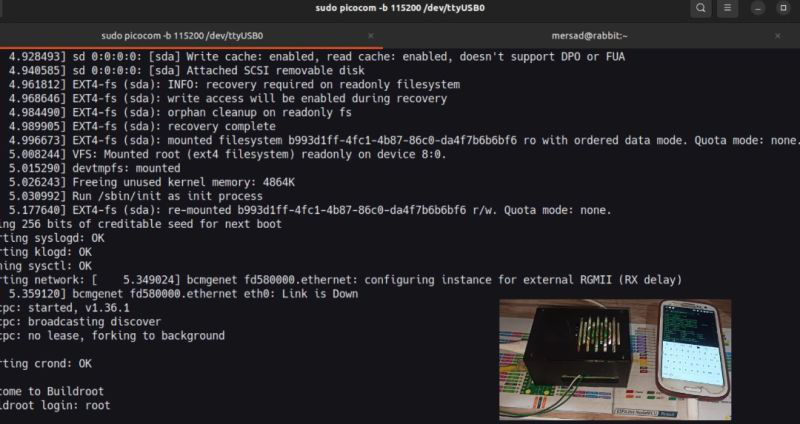
I was thinking about this scenario: I was somewhere and forgot to bring my USB storage that contains my rootfs. What should I do? I’ll use my phone instead.
We can usually mount rootfs in different ways such as NFS, Block/Char devices, but this time we’re dealing with a phone.
There are many ways to use a directory or image as our target’s rootfs. I considered a scenario where when I connect the device to the target, the target thinks a USB storage is connected and sees it as /dev/sda1.
Now we just need to do something to this phone so that when we connect it, it identifies itself as USB storage rather than a Galaxy S3.
USB Gadget Framework
Android uses the USB gadget framework to present itself as USB storage. So what does this framework do?
Let’s say my phone’s Vendor ID is 04E8, and when it connects to the target, it’s recognized as a Galaxy S3 according to its Vendor ID. Now suppose it uses the Vendor ID to say “I’m USB Storage” - the system will treat it as storage and ultimately we get /dev/sda1. (Actually, other tasks are performed as well; this is a small part of what the driver handles.)
Configuring Android as USB Storage
Now let’s tell Android to present the image we have as USB Storage to the system:
1
2
3
4
$ echo 0 > /sys/class/android_usb/android0/enable
$ echo "mass_storage" > /sys/class/android_usb/android0/functions
$ echo "/sdcard/Documents/rootfs.ext2" > /sys/class/android_usb/android0/f_mass_storage/lun/file
$ echo 1 > /sys/class/android_usb/android0/enable
Our work with the phone is done here. Now if we connect our phone to the system with a cable, it’s as if a USB Storage is connected, with contents being those of the rootfs image.
Target Configuration
Now it’s the target’s turn. Since I used Raspberry Pi for this test, I’ll add the USB OTG Controller section with DT overlay.
We also need two drivers that can be built-in or called in the kernel command line. Since we don’t have access to rootfs yet, we can’t do this with modprobe.
1
module_load = dwc2, g_mass_storage
Notes
- To perform operations on the phone side, you must be root user