A Vim-like Editor for U-Boot
Introduction
If you’ve ever worked with boot configuration files like uEnv.txt or extlinux.conf, you know how a tiny typo can completely ruin the boot flow. One wrong line, and suddenly the system won’t boot the way you expected.
The annoying part wasn’t making the mistake, it was fixing it. Most of the time, I had to either remove the storage device and edit the file on another machine, or go through a TFTP-based recovery process just to change a few lines of text. Neither option felt right when the file was already sitting there and U-Boot could already access it.
The Idea
What if, instead of moving the file to an editor, I bring an editor to the place where the file is already accessible?
So I decided to make one. The idea wasn’t to recreate the full power of Vim. I simply wanted a practical way to inspect and edit text files from the bootloader itself, without booting Linux and without relying on external tools.
What It Does
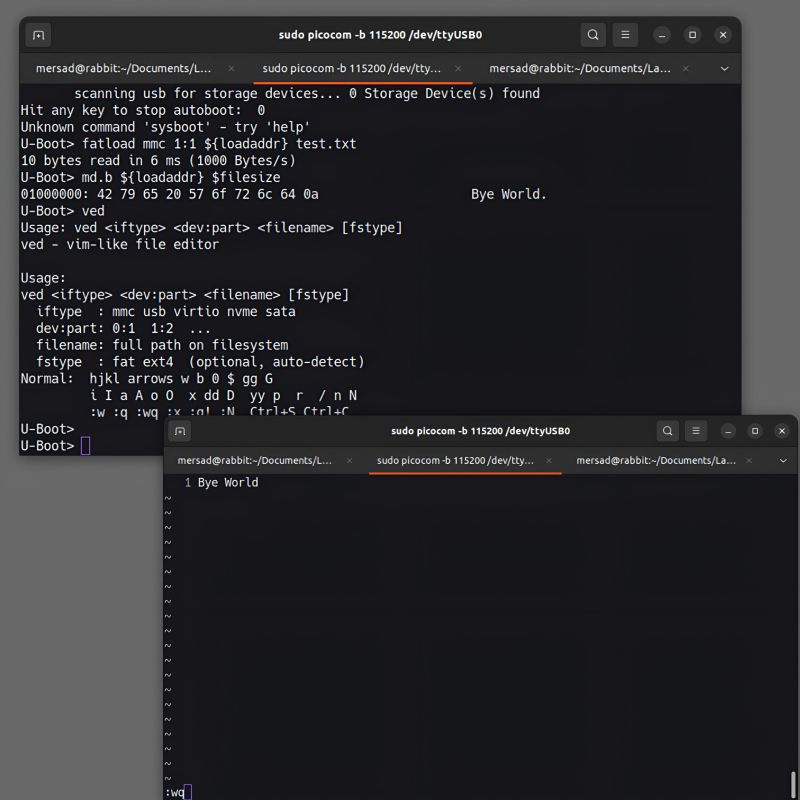
The result is ved, a modal, vim-inspired text editor that runs natively inside U-Boot, adding a new ved command to the shell. It works entirely within the bootloader environment — no kernel, no OS — relying only on U-Boot’s built-in filesystem API and UART console for input and output.
It supports the usual modal workflow you’d expect from Vim: Normal, Insert, Command, and Search modes, along with a status bar and ex-style commands such as :w, :q, and :e. Files can be opened directly from FAT or ext4 partitions, for example:
1
=> ved mmc 0:1 /boot/uEnv.txt
Under the hood, the project is split into a few focused source files handling command registration and input parsing, in-memory editing operations, filesystem access, and ANSI-based terminal rendering. Everything is statically allocated, with no heap usage at runtime, which keeps things predictable in a bootloader context.
Where to Get It
I’m not going to go through every implementation detail here, but if you’re curious about the architecture, key bindings, build configuration, or how to integrate it into your own U-Boot tree, the full source code and documentation are available on GitHub:
github.com/xmersad/vim-for-Uboot
Conclusion
This project turned a recurring annoyance into a small, self-contained tool. Instead of pulling storage devices or falling back to TFTP recovery every time a config file needed a quick edit, U-Boot can now edit its own files, right where they already are.